A UX/UI System For People 65+: Hiring A Caregiver
Introduction
A few months ago, I went to a restaurant called Mia’s Cantina with my grandparents as well as my parents. Because it was in the middle of the pandemic, they were not accommodated by the restaurant in terms of the menu. One had to scan a QR code to access the menu of the place, and I had to show them the ropes of how to do
this, and this was my introduction to the issues that face the elderly in terms of the challenges that the elderly face in terms of technology.
Now, my grandparents are independent, with the biggest concern of ours being about what happens when my grandfather dies. However, these are outliers, and they still struggle with technology. The idea is to design an app with the challenges that seniors face in mind, specifically one that allows them to research, hire, and contact any in-home care that they may need.
According to the Nielsen Norman research group, shared challenges that are faced by the elderly involve readability and that there is extraordinarily little room for error so they cannot advance and learn. This app aims to address this challenge through many different affordances on how to do these things.
Concept/Walkthrough
Since this is an app designed for seniors, defined as those 65 and older, there is a need for an app that is designed for a purpose for them. If needed, some may need to hire in-home caregivers and nurses that can aid them with their troubles. The following is a flow chart that details the user experience for the login process:
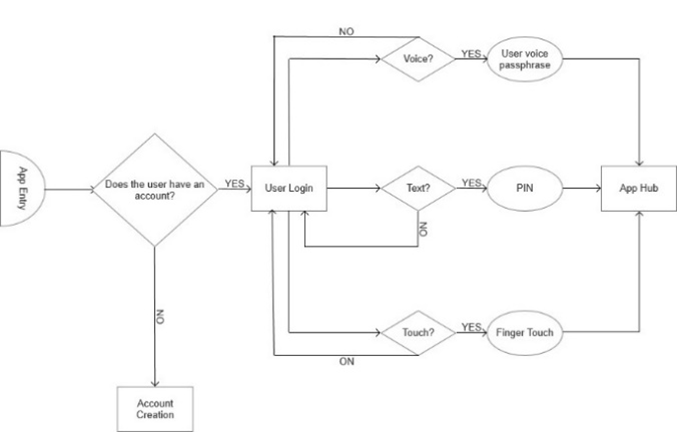
From the first opening of the app, the user is presented a variety of options on their method to log in if they already have their account. For example, one can use their voice to enter a passphrase, use a PIN number, or use some sort of touch aspect of the phone. The process of logging in has many redundancies so that the user can choose a flexible method of logging into their account. This flexibility means that the security of the account is somewhat compromised, supplying bad actors multiple methods of breaking in. Thus, in the backend, the database is secured using blockchain technology.
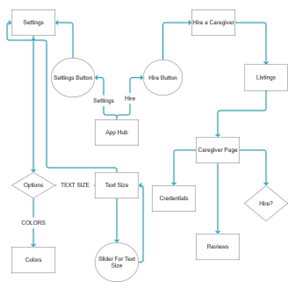
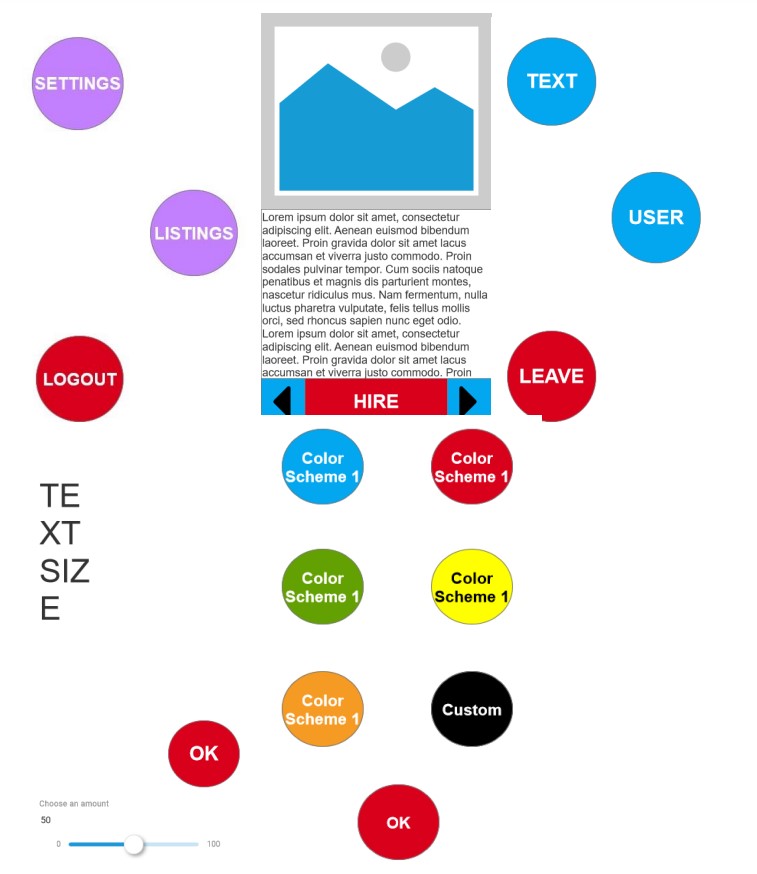
Figure 2 holds the flowchart for the app hub wherein the user can interact with the application. The app hub is divided into two sections: settings and listings. Listings holds all the actual information one may need for there to be some amount of hiring and contracting of the in-home caregiver, auto-scrolling in case it’s needed. Users can read a description of the skills and abilities of potential caregivers. Settings holds accessibility options for the app, including text size and colors.
Regarding payment, if there are insurance plans that enable one to pay for the prices, then there is access to insurance features. There’s also a feature for contacting the caretaker as well as the user, keeping channels open between the two parties.
TEchnical Aspects
In my own research, I discovered several technical aspects of this that are interesting. The following libraries and technologies are relevant to making it accessible, useful, and secure:
- Ally.js – accessibility library for JavaScript (https://allyjs.io/)
- Pizzicato.js – audio library for JavaScript (https://alemangui.github.io/pizzicato/)
- Blockchain – decentralized ledger of transactions
- Smart contracts – legal notarization substitute.
Ally.js
The Ally.js library allows access to methods for JavaScript that make things more accessible. For example, there are methods that allow one to render things inactive that are not being focused on. This is useful for my user experience system because it adjusts for the punishment that is felt by the user if they get it wrong. So, within the framework of the app, it renders possible feedback that can be obtained from selecting an item.
Pizzicato.js
Voice interaction is quite useful for accessibility purposes, including TTS for those who need it. The pizzicato.js allows one to create an audio file that would be used for control of the app’s functions. For example, the following is code that allows for one to save the voice of the user.
Blockchain Database
As addressed above, the necessity of accessible affordances means that security is compromised; there are multiple ways to get into the system. As such, while this will not be evident to the user, a blockchain database serving as the back end may be more secure than a traditional security system. Blockchains work on a decentralized ledger of transactions and are only identifiable by a cryptographic hash code.
Smart Contracts
Smart contracts are essentially digital contracts that get stored on the digital database. They may be useful to the users to make sure that in-home care is not abusive, or some sort of bad actor. To establish the terms and agreements of the process of hiring in-home care, the app may need to create a smart contract; no notaries are necessary to handle the legal affairs of the user. If terms and conditions are violated and elder abuse is occurring, there is a smart contract that says that the agreement occurred.
Other Features
Simple Error Messages
Error messages that provide feedback if something is wrong use simple, concise language that immediately conveys the point. For an example of this going wrong, Door Dash can often give errors that do not allow for the user without training to comprehend.
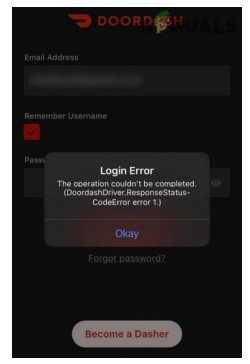
An error message in the app may look similar to this, but it would cut out the specific error, reducing it to a simple explanation of something that has gone wrong.
Blockchain security
To improve security as a result of the affordances given to the opening, the app uses a private blockchain for storing data rather than a typical database. Each transaction between the user and the database is utilized for storing the data involved.
 Drew Hesler